

How DNS Resolution Works
A practical presentation of how DNS queries resolves
What is DNS and why name resolution exists?
Domain Name System (DNS) is used to provide IP address from given Domain Name.
In technical terms we say, you have given a DNS query which will be resolved by DNS server and you will get a response. Here when you type google.com on browser, browser have given a DNS query for a Domain Name google.com now in response browser will get IP address of google’s server and google.com website will be loaded on your browser
As we can’t remember every website’s server IP address we have assigned a Domain Name for our website which is mapped with IP address. This IP address request is resolved by DNS.
What is the dig command and when it is used?
dig is a Linux command used to get information about a domain records ( without any Gui ) such as
NS record
A record
AAAA record
MX record
TXT record
CName record
if you want to know more about this read this.
Syntax to use dig command - dig <domain name> <record type>
So if you wanted to know about A record of any domain you can do like this
dig google.com A

; <<>> DiG 9.18.39-0ubuntu0.24.04.2-Ubuntu <<>> google.com A
;; global options: +cmd
;; Got answer:
;; ->>HEADER<<- opcode: QUERY, status: NOERROR, id: 222
;; flags: qr rd ra; QUERY: 1, ANSWER: 1, AUTHORITY: 0, ADDITIONAL: 1

;; OPT PSEUDOSECTION:
; EDNS: version: 0, flags:; udp: 65494
;; QUESTION SECTION:
;google.com.            IN    A

;; ANSWER SECTION:
google.com.        43    IN    A    142.250.183.78

;; Query time: 363 msec
;; SERVER: 127.0.0.53#53(127.0.0.53) (UDP)
;; WHEN: Fri Jan 23 20:42:56 IST 2026
;; MSG SIZE  rcvd: 55
In ANSWER SECTION we got this 142.250.183.78
What about CName ?
dig www.wikipedia.org CNAME

; <<>> DiG 9.18.39-0ubuntu0.24.04.2-Ubuntu <<>> www.wikipedia.org CNAME
;; global options: +cmd
;; Got answer:
;; ->>HEADER<<- opcode: QUERY, status: NOERROR, id: 53343
;; flags: qr rd ra; QUERY: 1, ANSWER: 1, AUTHORITY: 0, ADDITIONAL: 1

;; OPT PSEUDOSECTION:
; EDNS: version: 0, flags:; udp: 65494
;; QUESTION SECTION:
;www.wikipedia.org.        IN    CNAME

;; ANSWER SECTION:
www.wikipedia.org.    13278    IN    CNAME    dyna.wikimedia.org.

;; Query time: 43 msec
;; SERVER: 127.0.0.53#53(127.0.0.53) (UDP)
;; WHEN: Fri Jan 23 20:45:17 IST 2026
;; MSG SIZE  rcvd: 75
CName of www.wikipedia.org is dyna.wikimedia.org
You can also check it by your self you will get every info about domain record using dig
Understanding dig . NS and root name servers
Here . is representing root and NS is name server. So by using dig . NS we want to Name Servers of Root Servers .
What is Root server ?
Root server is used to store Name server ( NS ) about TLD servers like .com , .co, .in etc.
So when you want information about google.com, Root server responds you with NS records of the .com TLD.
By using these dig command you can also see NS for any domain names. Also we can we Name servers of root server.
dig . NS

; <<>> DiG 9.18.39-0ubuntu0.24.04.2-Ubuntu <<>> . NS
;; global options: +cmd
;; Got answer:
;; ->>HEADER<<- opcode: QUERY, status: NOERROR, id: 53764
;; flags: qr rd ra; QUERY: 1, ANSWER: 13, AUTHORITY: 0, ADDITIONAL: 1

;; OPT PSEUDOSECTION:
; EDNS: version: 0, flags:; udp: 65494
;; QUESTION SECTION:
;.                IN    NS

;; ANSWER SECTION:
.            363524    IN    NS    c.root-servers.net.
.            363524    IN    NS    a.root-servers.net.
.            363524    IN    NS    l.root-servers.net.
.            363524    IN    NS    j.root-servers.net.
.            363524    IN    NS    f.root-servers.net.
.            363524    IN    NS    h.root-servers.net.
.            363524    IN    NS    d.root-servers.net.
.            363524    IN    NS    b.root-servers.net.
.            363524    IN    NS    k.root-servers.net.
.            363524    IN    NS    i.root-servers.net.
.            363524    IN    NS    m.root-servers.net.
.            363524    IN    NS    e.root-servers.net.
.            363524    IN    NS    g.root-servers.net.

;; Query time: 75 msec
;; SERVER: 127.0.0.53#53(127.0.0.53) (UDP)
;; WHEN: Fri Jan 23 20:55:19 IST 2026
;; MSG SIZE  rcvd: 239
We got 13 Name servers of root server
In reality there are more that 13 root servers which uses the same IP address using Anycast
Understanding dig com NS and TLD name servers
Now as we have discussed that there are different types of TLD server, in that we have one for com also.
Let us see the Name servers for this com TLD.
dig com NS

; <<>> DiG 9.18.39-0ubuntu0.24.04.2-Ubuntu <<>> com NS
;; global options: +cmd
;; Got answer:
;; ->>HEADER<<- opcode: QUERY, status: NOERROR, id: 47325
;; flags: qr rd ra; QUERY: 1, ANSWER: 13, AUTHORITY: 0, ADDITIONAL: 1

;; OPT PSEUDOSECTION:
; EDNS: version: 0, flags:; udp: 65494
;; QUESTION SECTION:
;com.                IN    NS

;; ANSWER SECTION:
com.            103837    IN    NS    h.gtld-servers.net.
com.            103837    IN    NS    m.gtld-servers.net.
com.            103837    IN    NS    b.gtld-servers.net.
com.            103837    IN    NS    d.gtld-servers.net.
com.            103837    IN    NS    a.gtld-servers.net.
com.            103837    IN    NS    g.gtld-servers.net.
com.            103837    IN    NS    c.gtld-servers.net.
com.            103837    IN    NS    l.gtld-servers.net.
com.            103837    IN    NS    j.gtld-servers.net.
com.            103837    IN    NS    f.gtld-servers.net.
com.            103837    IN    NS    k.gtld-servers.net.
com.            103837    IN    NS    e.gtld-servers.net.
com.            103837    IN    NS    i.gtld-servers.net.

;; Query time: 671 msec
;; SERVER: 127.0.0.53#53(127.0.0.53) (UDP)
;; WHEN: Fri Jan 23 21:03:06 IST 2026
;; MSG SIZE  rcvd: 256
In name server you can see gtld word like in this a.gtld-servers.net. which says yes its NS for TLD server.
Here in
gtldits full form is Generic Top-Level Domain.
Understanding dig google.com NS and authoritative name servers
Now lets see NS for a domain name google.com .
dig google.com NS

; <<>> DiG 9.18.39-0ubuntu0.24.04.2-Ubuntu <<>> google.com NS
;; global options: +cmd
;; Got answer:
;; ->>HEADER<<- opcode: QUERY, status: NOERROR, id: 60101
;; flags: qr rd ra; QUERY: 1, ANSWER: 4, AUTHORITY: 0, ADDITIONAL: 7

;; OPT PSEUDOSECTION:
; EDNS: version: 0, flags:; udp: 65494
;; QUESTION SECTION:
;google.com.            IN    NS

;; ANSWER SECTION:
google.com.        65148    IN    NS    ns2.google.com.
google.com.        65148    IN    NS    ns3.google.com.
google.com.        65148    IN    NS    ns4.google.com.
google.com.        65148    IN    NS    ns1.google.com.

;; ADDITIONAL SECTION:
ns3.google.com.        198596    IN    AAAA    2001:4860:4802:36::a
ns4.google.com.        231195    IN    AAAA    64:ff9b::d8ef:260a
ns4.google.com.        237521    IN    AAAA    2001:4860:4802:38::a
ns1.google.com.        225263    IN    AAAA    2001:4860:4802:32::a
ns2.google.com.        236594    IN    AAAA    64:ff9b::d8ef:220a
ns2.google.com.        237344    IN    AAAA    2001:4860:4802:34::a

;; Query time: 28 msec
;; SERVER: 127.0.0.53#53(127.0.0.53) (UDP)
;; WHEN: Fri Jan 23 21:08:09 IST 2026
;; MSG SIZE  rcvd: 279
So google.com has 4 NS.
What are authoritative servers ?
Just now we have seen those 4 NS are nothing but authoritative servers which stores the IP address of google.com domain.
proof -
dig @ns1.google.com google.com A

; <<>> DiG 9.18.39-0ubuntu0.24.04.2-Ubuntu <<>> @ns1.google.com google.com A
; (2 servers found)
;; global options: +cmd
;; Got answer:
;; ->>HEADER<<- opcode: QUERY, status: NOERROR, id: 19049
;; flags: qr aa rd; QUERY: 1, ANSWER: 1, AUTHORITY: 0, ADDITIONAL: 1
;; WARNING: recursion requested but not available

;; OPT PSEUDOSECTION:
; EDNS: version: 0, flags:; udp: 512
;; QUESTION SECTION:
;google.com.            IN    A

;; ANSWER SECTION:
google.com.        300    IN    A    142.250.71.110

;; Query time: 109 msec
;; SERVER: 2001:4860:4802:32::a#53(ns1.google.com) (UDP)
;; WHEN: Fri Jan 23 21:11:27 IST 2026
;; MSG SIZE  rcvd: 55
Explanation -
Here i have used command dig @ns1.google.com google.com A in this
A → Mentioned which Domain record i needed
google.com → Mentioned which domain name information is needed
@ns1.google.com → Mentioned which NS record should use to make the request
So i got IP address ( A Record ) in answer 142.250.71.110
Killer Visualization for DNS query Resolving process
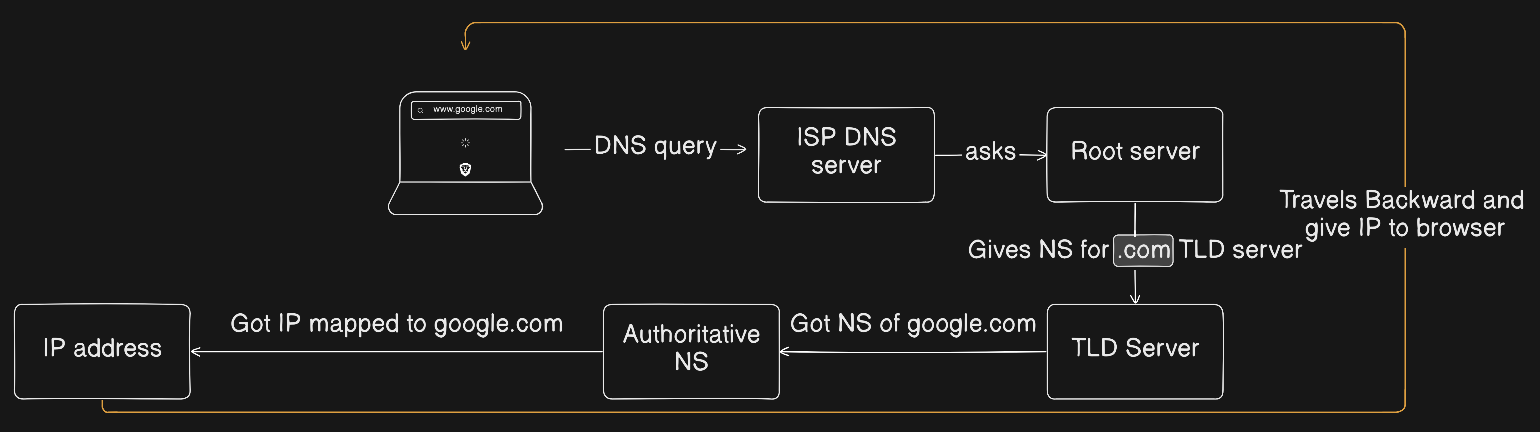
In this section we are going to see the process of DNS query resolution using Linux Commands !
“The following
digcommands manually demonstrate the iterative DNS resolution process. In reality, this work is done automatically by a recursive resolver (ISP DNS).”
Step 1
Here we will create a DNS query to visit google.com (assuming the recursive resolver does not have google.com cached)
Here our ISP DNS server will go to Root server which will give us NS for TLD servers like com , co, in , etc.
using dig . NS command
dig . NS

; <<>> DiG 9.18.39-0ubuntu0.24.04.2-Ubuntu <<>> . NS
;; global options: +cmd
;; Got answer:
;; ->>HEADER<<- opcode: QUERY, status: NOERROR, id: 40132
;; flags: qr rd ra; QUERY: 1, ANSWER: 13, AUTHORITY: 0, ADDITIONAL: 1

;; OPT PSEUDOSECTION:
; EDNS: version: 0, flags:; udp: 65494
;; QUESTION SECTION:
;.                IN    NS

;; ANSWER SECTION:
.            310637    IN    NS    a.root-servers.net.
.            310637    IN    NS    b.root-servers.net.
.            310637    IN    NS    j.root-servers.net.
.            310637    IN    NS    d.root-servers.net.
.            310637    IN    NS    f.root-servers.net.
.            310637    IN    NS    k.root-servers.net.
.            310637    IN    NS    h.root-servers.net.
.            310637    IN    NS    i.root-servers.net.
.            310637    IN    NS    l.root-servers.net.
.            310637    IN    NS    m.root-servers.net.
.            310637    IN    NS    g.root-servers.net.
.            310637    IN    NS    c.root-servers.net.
.            310637    IN    NS    e.root-servers.net.

;; Query time: 90 msec
;; SERVER: 127.0.0.53#53(127.0.0.53) (UDP)
;; WHEN: Sat Jan 24 11:36:46 IST 2026
;; MSG SIZE  rcvd: 239
This command does not directly resolve
google.com.
It only shows which servers are authoritative for the root zone.
Step 2
Here we got authoritative NS for Root zone(.) from which we can get NS of com TLD zone !
using command dig @a.root-servers.net. com NS
Explanation -
@a.root-servers.net. → send the query directly to a root server
com NS → ask for name servers of the .com TLD
dig @a.root-servers.net. com NS

; <<>> DiG 9.18.39-0ubuntu0.24.04.2-Ubuntu <<>> @a.root-servers.net. com NS
; (2 servers found)
;; global options: +cmd
;; Got answer:
;; ->>HEADER<<- opcode: QUERY, status: NOERROR, id: 32989
;; flags: qr rd; QUERY: 1, ANSWER: 0, AUTHORITY: 13, ADDITIONAL: 27
;; WARNING: recursion requested but not available

;; OPT PSEUDOSECTION:
; EDNS: version: 0, flags:; udp: 4096
;; QUESTION SECTION:
;com.                IN    NS

;; AUTHORITY SECTION:
com.            172800    IN    NS    l.gtld-servers.net.
com.            172800    IN    NS    j.gtld-servers.net.
com.            172800    IN    NS    h.gtld-servers.net.
com.            172800    IN    NS    d.gtld-servers.net.
com.            172800    IN    NS    b.gtld-servers.net.
com.            172800    IN    NS    f.gtld-servers.net.
com.            172800    IN    NS    k.gtld-servers.net.
com.            172800    IN    NS    m.gtld-servers.net.
com.            172800    IN    NS    i.gtld-servers.net.
com.            172800    IN    NS    g.gtld-servers.net.
com.            172800    IN    NS    a.gtld-servers.net.
com.            172800    IN    NS    c.gtld-servers.net.
com.            172800    IN    NS    e.gtld-servers.net.

;; ADDITIONAL SECTION:
l.gtld-servers.net.    172800    IN    A    192.41.162.30
l.gtld-servers.net.    172800    IN    AAAA    2001:500:d937::30
j.gtld-servers.net.    172800    IN    A    192.48.79.30
j.gtld-servers.net.    172800    IN    AAAA    2001:502:7094::30
h.gtld-servers.net.    172800    IN    A    192.54.112.30
h.gtld-servers.net.    172800    IN    AAAA    2001:502:8cc::30
d.gtld-servers.net.    172800    IN    A    192.31.80.30
d.gtld-servers.net.    172800    IN    AAAA    2001:500:856e::30
b.gtld-servers.net.    172800    IN    A    192.33.14.30
b.gtld-servers.net.    172800    IN    AAAA    2001:503:231d::2:30
f.gtld-servers.net.    172800    IN    A    192.35.51.30
f.gtld-servers.net.    172800    IN    AAAA    2001:503:d414::30
k.gtld-servers.net.    172800    IN    A    192.52.178.30
k.gtld-servers.net.    172800    IN    AAAA    2001:503:d2d::30
m.gtld-servers.net.    172800    IN    A    192.55.83.30
m.gtld-servers.net.    172800    IN    AAAA    2001:501:b1f9::30
i.gtld-servers.net.    172800    IN    A    192.43.172.30
i.gtld-servers.net.    172800    IN    AAAA    2001:503:39c1::30
g.gtld-servers.net.    172800    IN    A    192.42.93.30
g.gtld-servers.net.    172800    IN    AAAA    2001:503:eea3::30
a.gtld-servers.net.    172800    IN    A    192.5.6.30
a.gtld-servers.net.    172800    IN    AAAA    2001:503:a83e::2:30
c.gtld-servers.net.    172800    IN    A    192.26.92.30
c.gtld-servers.net.    172800    IN    AAAA    2001:503:83eb::30
e.gtld-servers.net.    172800    IN    A    192.12.94.30
e.gtld-servers.net.    172800    IN    AAAA    2001:502:1ca1::30

;; Query time: 101 msec
;; SERVER: 64:ff9b::c629:4#53(a.root-servers.net.) (UDP)
;; WHEN: Sat Jan 24 11:41:15 IST 2026
;; MSG SIZE  rcvd: 828
We have got NS of com TLD servers
Root servers do not know the IP address of
google.com.
They only return a referral to the.comTLD name servers.
Step 3
Now we query a .com TLD server to find the authoritative name servers for google.com.
by using command dig @l.gtld-servers.net. google.com NS
dig @l.gtld-servers.net. google.com NS

; <<>> DiG 9.18.39-0ubuntu0.24.04.2-Ubuntu <<>> @l.gtld-servers.net. google.com NS
; (2 servers found)
;; global options: +cmd
;; Got answer:
;; ->>HEADER<<- opcode: QUERY, status: NOERROR, id: 16063
;; flags: qr rd; QUERY: 1, ANSWER: 0, AUTHORITY: 4, ADDITIONAL: 9
;; WARNING: recursion requested but not available

;; OPT PSEUDOSECTION:
; EDNS: version: 0, flags:; udp: 4096
;; QUESTION SECTION:
;google.com.            IN    NS

;; AUTHORITY SECTION:
google.com.        172800    IN    NS    ns2.google.com.
google.com.        172800    IN    NS    ns1.google.com.
google.com.        172800    IN    NS    ns3.google.com.
google.com.        172800    IN    NS    ns4.google.com.

;; ADDITIONAL SECTION:
ns2.google.com.        172800    IN    AAAA    2001:4860:4802:34::a
ns2.google.com.        172800    IN    A    216.239.34.10
ns1.google.com.        172800    IN    AAAA    2001:4860:4802:32::a
ns1.google.com.        172800    IN    A    216.239.32.10
ns3.google.com.        172800    IN    AAAA    2001:4860:4802:36::a
ns3.google.com.        172800    IN    A    216.239.36.10
ns4.google.com.        172800    IN    AAAA    2001:4860:4802:38::a
ns4.google.com.        172800    IN    A    216.239.38.10

;; Query time: 147 msec
;; SERVER: 2001:500:d937::30#53(l.gtld-servers.net.) (UDP)
;; WHEN: Sat Jan 24 11:43:03 IST 2026
;; MSG SIZE  rcvd: 287
We got NS servers for domain google.com
TLD servers do not return the IP of
google.com.
They only return which servers are authoritative for the domain.
Step 4
Now we query one authoritative name server of Google to get the A record (IP address) of google.com.
using command - dig @ns1.google.com google.com A
dig @ns1.google.com google.com A

; <<>> DiG 9.18.39-0ubuntu0.24.04.2-Ubuntu <<>> @ns1.google.com google.com A
; (2 servers found)
;; global options: +cmd
;; Got answer:
;; ->>HEADER<<- opcode: QUERY, status: NOERROR, id: 44463
;; flags: qr aa rd; QUERY: 1, ANSWER: 1, AUTHORITY: 0, ADDITIONAL: 1
;; WARNING: recursion requested but not available

;; OPT PSEUDOSECTION:
; EDNS: version: 0, flags:; udp: 512
;; QUESTION SECTION:
;google.com.            IN    A

;; ANSWER SECTION:
google.com.        300    IN    A    142.250.207.142

;; Query time: 200 msec
;; SERVER: 2001:4860:4802:32::a#53(ns1.google.com) (UDP)
;; WHEN: Sat Jan 24 11:44:54 IST 2026
;; MSG SIZE  rcvd: 55
This is the final resolved IP address of google.com → 142.250.207.142