

How a Browser Works: A Beginner-Friendly Guide to Browser Internals
Understand how a webpage is Rendered in a browser
What a browser actually is?
There are many parts of browser which handles the rendering process of a website ( we will understand what rendering actually means ahead of our blog ).
These parts are
User Interface (UI)
Networking
Browser Engine
Rendering Engine
JavaScript Engine
Data Storage
By understanding these parts of browser we can understand how a browser works internally and exactly a browser is. So lets begin with UI.
User Interface (UI)
Browser gives a a user interface for following things
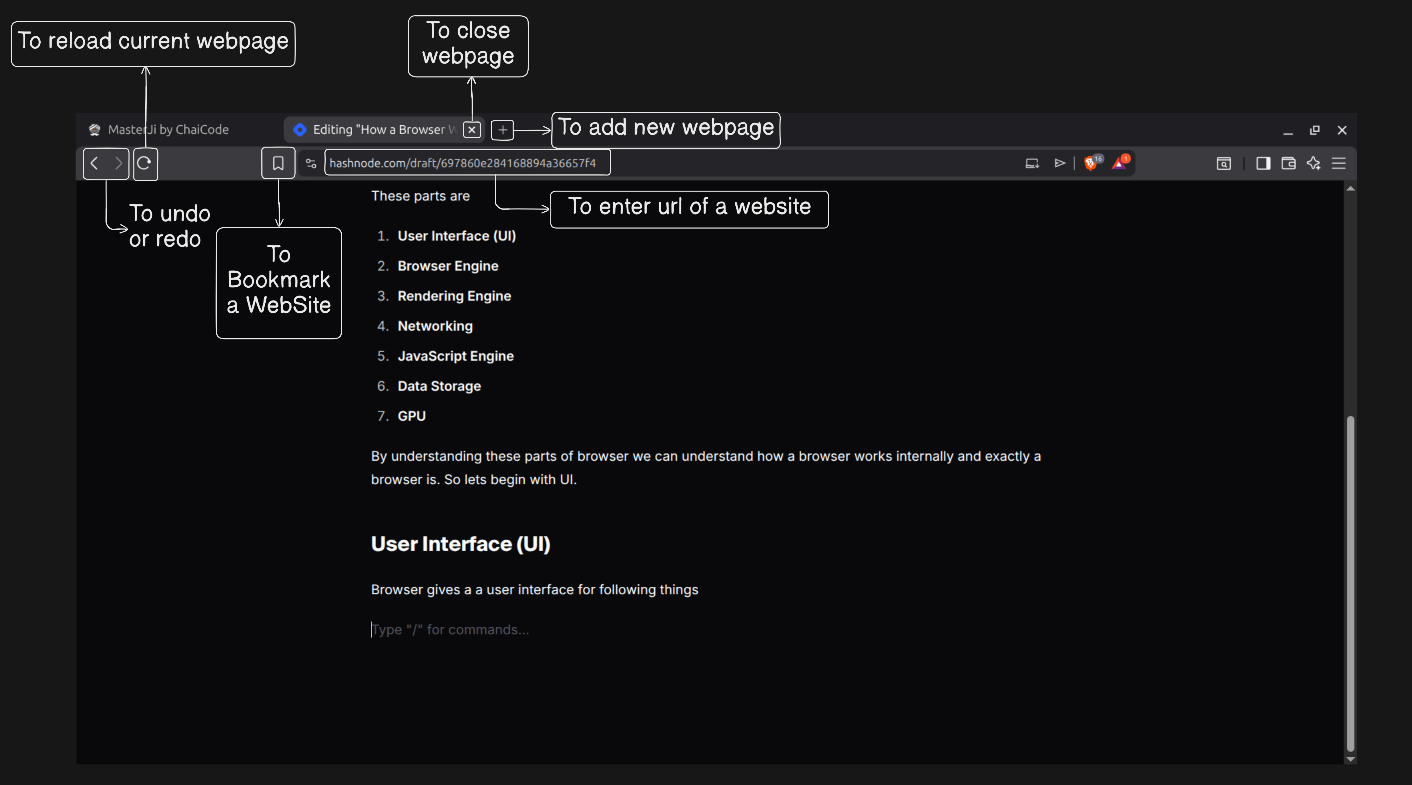
and much more….
Networking
Browser networking done
HTTP requests like GET, POST, PUT, DELETE
DNS Networking
DNS resolution
Transport Layer Protocols
You can know more about it by reading my blogs. HTTP and TCP , DNS resolution, TCP
Browser Engine
The browser engine coordinates the rendering engine and JavaScript engine to process HTML, CSS, and JavaScript.
Rendering engine
They are used to Understand HTML, CSS. These engines are Blink, Geko, Webkit.
JavaScript engine -
They are used to Understand Js. These engines are V8, SpiderMonkey, JavaScriptCore.
Why browsers need a engine ?
Browser Engine coordinates with Rendering engine and JavaScript Engine.
The rendering engine renders HTML and CSS, while the JavaScript engine executes JavaScript that can modify the DOM and CSSOM.
Let us know more about Rendering engine and JavaScript engine.
Rendering Engine
Rendering Engine like Blink, Geko parse the HTML and CSS and makes its DOM and CSSOM respectively.
What does parsing HTML and CSS means?
When you give computer to perform 2 + 5×3,
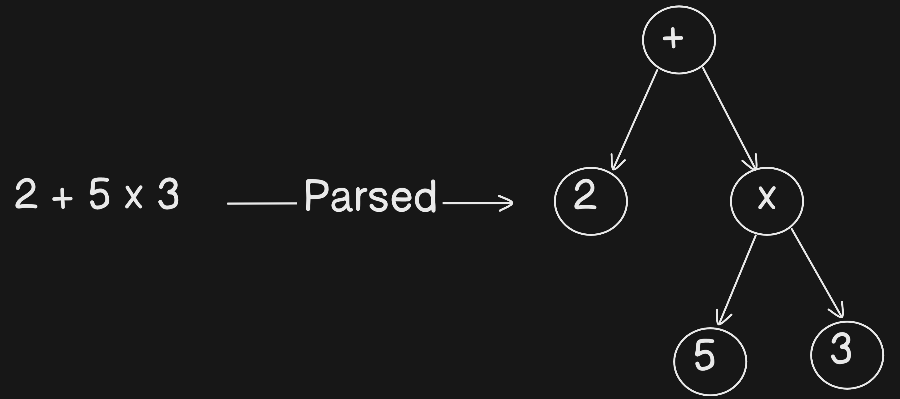
computer first parse it makes a tree of it and then compute because computer cant understand text just like HTML and CSS.
Rendering engine parse HTML → DOM Tree and CSS → CSSOM Tree
Computers cannot work directly with raw text meaningfully.
They need:
hierarchy
rules
relationships
Parsing gives:
parent-child structure
properties
meaning
JavaScript Engine
JavaScript engines like V8 parse JavaScript into an AST, compile it, and then execute it.
JavaScript Engines parse JavaScript and make AST (Abstract Syntax Tree).
JavaScript → AST
Matching DOM and CSSOM
After DOM and CSSOM are create, browser matches the DOM and CSSOM like Takes each DOM node and Finds which CSS rules apply to it.
So after combining DOM and CSSOM a Render tree is created.
DOM + CSSOM → Render Tree
Layout (reflow), painting, and display
After Creating rendering Tree this flow occurs
Rendering Tree → Layout → Painting → Display
Let us understand these 3 now.
Layout
As you can guess it computes the Layout like width, height of an object. Font size of texts. Gaps between two objects, etc.
Painting
Yes its does all work of colors, background image, shadows, etc.
Display
In this, the browser uses the GPU to combine painted layers and show the final pixels on the screen.